Canceling a Planet Fitness membership is easier when you prepare the correct information, follow an accepted cancellation method, and keep proof of your request.
Use this Planet Fitness cancellation checklist before, during, and after canceling your membership. It can help you avoid missing information, billing deadlines, or important confirmation steps.
Quick Answer: Before canceling, review your membership agreement and billing dates. During cancellation, use an accepted method and request written proof. After cancellation, confirm the effective date and monitor your bank account for unexpected charges.
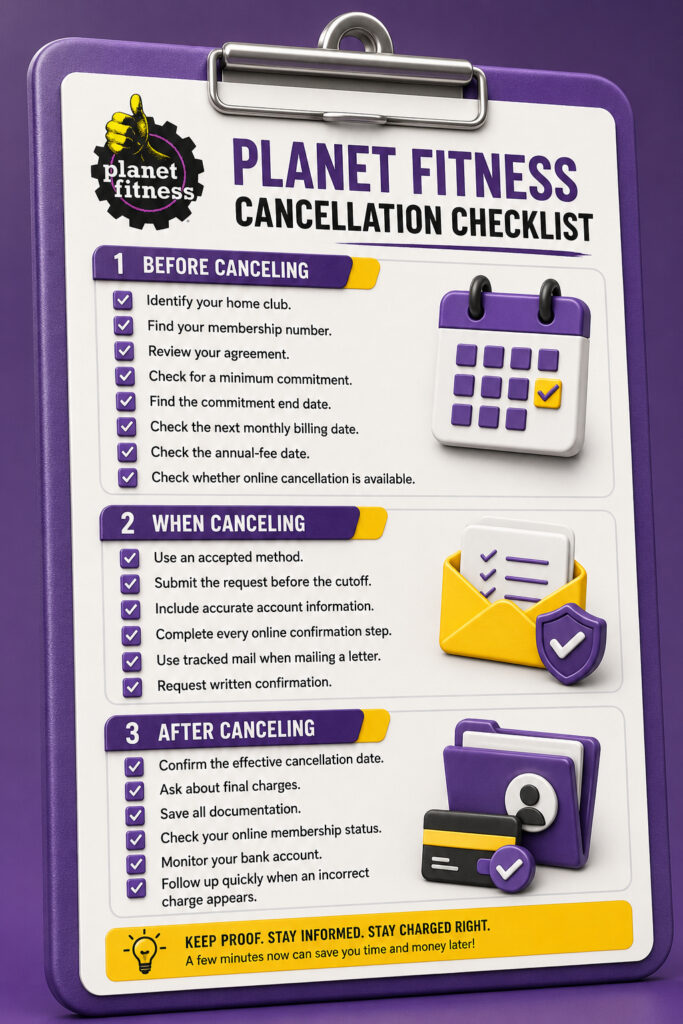
Before Canceling Your Planet Fitness Membership
Complete these steps before submitting your cancellation request.
1. Identify Your Home Club
Your home club is the Planet Fitness location that manages your membership agreement and billing.
You should normally submit your cancellation request through this location.
You may find your home club in:
- Your original membership agreement
- Your Planet Fitness online account
- The PF App
- Your welcome email
- Previous billing records
- Your digital Club Pass
Do not assume that any Planet Fitness location can cancel your membership. Another club may not have authority to manage your account.
2. Find Your Membership Number
Your membership number helps the club locate the correct account.
You may find it in:
- Your membership agreement
- Your online member account
- A membership email
- Your Club Pass information
- Previous communication from the gym
When you cannot find the number, contact your home club and provide your full name, email address, and phone number.
3. Review Your Membership Agreement
Read your agreement before canceling.
Check for information about:
- Cancellation methods
- Monthly dues
- Annual membership fees
- Commitment period
- Commitment end date
- Early buyout fee
- Billing deadlines
- Required written notice
- Outstanding balances
The agreement you signed is more reliable than information from another member because Planet Fitness terms may vary by location and promotion.
4. Check for a Minimum Commitment
Some memberships include a minimum commitment period.
For example, an agreement may require you to remain enrolled for a specific number of months. Canceling before that period ends may result in an early buyout fee.
A no-commitment membership generally does not have the same minimum enrollment requirement.
Do not assume that every Classic or PF Black Card membership has identical terms.
5. Find the Commitment End Date
Ask your home club to confirm the exact date when your minimum commitment ends.
Knowing this date can help you decide whether to:
- Cancel immediately
- Wait until the commitment ends
- Ask about a possible buyout fee
- Consider a membership downgrade
- Request a temporary freeze
Completing the commitment period does not always cancel the membership automatically. You may still need to submit a formal cancellation request.
6. Check the Next Monthly Billing Date
Review the date of your next monthly payment.
Planet Fitness monthly dues are commonly drafted on the 17th. To help stop the next monthly draft, your home club should generally receive your cancellation request by the 10th.
Submit the request early because billing changes may require processing time.
7. Check the Annual-Fee Date
The annual membership fee is separate from monthly dues.
Its amount and billing date may vary based on your club, membership plan, promotion, and agreement.
To help stop an upcoming annual fee, your home club should generally receive the cancellation request by the 25th of the previous month.
For example, if the annual fee is scheduled for August 1, submit your request by July 25 or earlier.
8. Check Whether Online Cancellation Is Available
Log in through the official Planet Fitness website and check your account-management options.
Look for an option such as:
- Cancel Membership
- End Membership
- Manage Membership
When the cancellation option is unavailable, contact your home club and ask whether you need to cancel in person or by written mail.
When Canceling Your Planet Fitness Membership
Follow these steps while submitting your cancellation request.
1. Use an Accepted Cancellation Method
Depending on your membership and home club, you may be able to cancel:
| Cancellation Method | What to Do | Proof to Keep |
|---|---|---|
| Online | Use the Planet Fitness website member portal | Screenshot and confirmation email |
| In person | Visit your Planet Fitness home club | Signed form or printed receipt |
| By mail | Send a signed letter to your home club | Letter copy, tracking, and delivery confirmation |
Do not rely only on deleting the PF App, removing your Club Pass, or stopping visits to the gym.
These actions do not automatically cancel the membership agreement.
2. Submit the Request Before the Billing Cutoff
Do not wait until the day before your next payment.
Submit the request early enough for your home club to receive and process it before the applicable deadline.
Remember:
- Submit by the 10th to help stop the monthly draft on the 17th.
- Submit by the 25th of the previous month to help stop an upcoming annual fee.
Your specific billing dates may vary, so review your agreement.
3. Include Accurate Account Information
Make sure your cancellation request includes correct information.
You may need:
- Full legal name
- Membership number
- Home club name
- Email address
- Phone number
- Mailing address
- Requested cancellation date
- Signature, when required
Incorrect or incomplete details may delay processing.
4. Complete Every Online Confirmation Step
Selecting the first cancellation button may not complete the process.
Continue until you see a final confirmation page.
After submitting the request:
- Take a screenshot.
- Save the confirmation email.
- Record the date and time.
- Check whether your membership status changed.
Do not close the browser before receiving confirmation.
5. Use Tracked Mail When Sending a Letter
When canceling by mail, use a mailing service that provides tracking and delivery confirmation.
Keep:
- A copy of the signed letter
- Postal receipt
- Tracking number
- Delivery date
- Return receipt, when available
The date the club receives your request may be more important than the date you mailed it.
6. Request Written Confirmation
Always ask for written proof that the cancellation was processed.
The confirmation should ideally include:
- Date the request was received
- Effective cancellation date
- Current membership status
- Final amount due
- Whether another monthly charge is scheduled
- Whether an annual fee is scheduled
Written confirmation is useful if a billing dispute appears later.
After Canceling Your Planet Fitness Membership
Do not stop checking your account immediately after submitting the request.
Complete these final steps.
1. Confirm the Effective Cancellation Date
The date you submit the request and the effective cancellation date may not be the same.
Ask your home club:
“What is the exact date my membership will officially end?”
Keep the answer in writing.
2. Ask About Final Charges
Ask whether any additional payment remains scheduled.
Possible final charges may include:
- Monthly dues already processing
- Annual fee when the deadline was missed
- Applicable early buyout fee
- Past-due membership balance
- Returned-payment fee
- Applicable taxes
Ask the club to explain each charge before making a payment.
3. Save All Documentation
Keep every cancellation record in one folder.
Important documents include:
- Membership agreement
- Cancellation form
- Online screenshots
- Confirmation email
- Cancellation letter
- Mailing receipt
- Delivery confirmation
- Bank statement
- Written communication from the club
Keep these records until you are sure the membership is closed and billing has stopped.
4. Check Your Online Membership Status
Log in to your Planet Fitness account after cancellation.
Check whether the account shows:
- Canceled
- Inactive
- Ended
- Pending cancellation
When the account still appears active, contact your home club and provide your cancellation proof.
5. Monitor Your Bank Account
Check your bank or credit-union account after the next regular monthly and annual billing dates.
Look for:
- Regular monthly membership dues
- Annual membership fee
- Duplicate charge
- Unexpected buyout fee
- Charge after the confirmed cancellation date
A charge may still appear if it was already processing or if the cancellation deadline was missed.
6. Follow Up Quickly When a Charge Appears
Contact your home club as soon as you notice an incorrect charge.
Provide:
- Cancellation confirmation
- Effective cancellation date
- Charge date
- Charge amount
- Bank-statement copy
- Delivery confirmation, when applicable
Ask the club to explain the charge and confirm whether a refund or adjustment is available.
Printable Planet Fitness Cancellation Checklist
Before Canceling
- Identify your Planet Fitness home club.
- Find your membership number.
- Review your membership agreement.
- Check whether your plan has a minimum commitment.
- Find your commitment end date.
- Check the next monthly billing date.
- Check the annual-fee date.
- Check whether online cancellation is available.
- Ask whether an early buyout fee applies.
- Check for an outstanding balance.
During Cancellation
- Use an accepted cancellation method.
- Submit the request before the billing cutoff.
- Include accurate account information.
- Complete every online confirmation screen.
- Use tracked mail when sending a letter.
- Request written confirmation.
- Record the date and time.
- Save the employee’s name when canceling in person.
- Ask about final monthly or annual charges.
After Cancellation
- Confirm the effective cancellation date.
- Ask for a final account balance.
- Save all cancellation documents.
- Check your online membership status.
- Monitor your bank account.
- Follow up quickly after an incorrect charge.
- Keep proof until all billing has stopped.
Common Planet Fitness Cancellation Mistakes
Avoid these common problems:
Canceling Through the Wrong Club
Submit your request through the home club that manages your membership.
Waiting Until the Last Day
Billing changes may take time to process. Submit the request several days before the cutoff.
Deleting the PF App
Deleting the app does not cancel the paid membership agreement.
Forgetting the Annual Fee
Monthly dues and annual membership fees may have different deadlines.
Mailing Without Tracking
Without delivery proof, you may not be able to show when the club received your request.
Leaving Without Written Proof
Always request a confirmation email, signed form, or receipt.
Assuming the Commitment Ends the Membership
Finishing a minimum commitment does not necessarily close the membership automatically.
Frequently Asked Questions
What do I need before canceling Planet Fitness?
You should know your home club, membership number, billing dates, annual-fee date, commitment end date, and available cancellation methods.
What is the most important cancellation document?
Written confirmation showing the effective cancellation date is one of the most important records to keep.
Can I cancel Planet Fitness by deleting the app?
No. Deleting or uninstalling the PF App does not automatically end the membership agreement.
Should I cancel before the next billing date?
Yes. Submit the request before the applicable cutoff and allow enough time for processing.
What is the monthly cancellation deadline?
To help stop the regular monthly draft on the 17th, your home club should generally receive the request by the 10th.
How do I avoid the annual fee?
Submit the cancellation request by the 25th of the month before the annual-fee date.
What proof should I keep after canceling?
Keep screenshots, confirmation emails, signed forms, mailed-letter tracking, delivery confirmation, and relevant bank statements.
How do I know whether the cancellation worked?
Look for written confirmation and check whether your online membership status shows canceled or inactive.
What should I do if my account still appears active?
Contact your home club and provide proof showing when and how you submitted the cancellation request.
Why did I receive another charge after canceling?
The payment may already have been processing, or the request may have arrived after the monthly or annual-fee deadline.
Should I monitor my bank account after canceling?
Yes. Check your account after the next normal billing date and annual-fee date.
Can I cancel without my membership number?
Your home club may still locate the account using your name, email, phone number, and identification, but having the membership number can make the process easier.
Final Answer
A complete Planet Fitness cancellation checklist should cover three stages: preparing your account information, properly submitting the request, and confirming that billing has stopped.
Before canceling, review your agreement and billing dates. During cancellation, use an accepted method and save written proof. After cancellation, confirm the effective date, check your membership status, and monitor your bank account.
Following these steps can reduce confusion and make it easier to resolve any unexpected charge.